
StitchSnap: Cross Stitch Chart
Turn any photo into a cross-stitch chart.
A printable chart in seconds — right on your phone. StitchSnap matches your photo to industry-standard DMC floss codes, generates a multi-page printable PDF, and gives you a written stitch-by-stitch pattern — everything you need to start stitching today.

Free to try: chart preview with watermark. For iPhone, iOS 17.0 or later.
Built for hobbyists, gift-makers, and beginners alike.

How it works
Pick a photo, get a pattern.
-
1
Pick, snap or sample a photo
Pick a sample, snap a photo with the camera, or upload from your library. Then crop it.
-
2
Choose a size, get a chart with real DMC codes
Choose Quick for a fast preview, Standard for the sweet spot, or Detailed for a high-resolution chart.
- Quick · 8 colors
- Standard · 20 colors
- Detailed · 36 colors
-
3
See the finished size, print the PDF
Check the finished size on Aida at 14, 16 and 18 count, plus a time estimate. Then unlock the printable PDF in the app.


What makes it different
A stitchable chart on the spot.
-
Phone-camera-first
No desktop software — snap a photo of your pet, your kid, or a favorite memory and get a stitchable chart on the spot.
-
Real DMC floss codes, matched for you
Every cell maps to a real color, with skein counts you can shop with. Each color gets its DMC code, name and symbol, plus stitch and skein counts.
-
No confetti
Stray single stitches and tiny specks of color are cleaned up before you see the chart.
-
A finished-piece preview on AidaMockup
The sample photos come with an AI-generated mockup of the finished piece on 14-count Aida, so you can see it before you commit to your floss.
-
Printable PDF and a written pattern
A multi-page printable PDF with the chart pages and a DMC legend, plus a written stitch-by-stitch pattern. Unlock both in the app.
Row 11: 20× ● (DMC Blanc), 3× ▲ (DMC 3866), 75× ● (DMC Blanc)…
-
Tuned for fur and skin tones
The color matching is tuned to stay accurate on fur and on skin tones, mapping to the real DMC flosses stitchers actually use.
A real sample
One ginger tabby, stitch by stitch.
This is the Pet Light sample photo that ships with the app, and the Standard-size chart StitchSnap made from it.

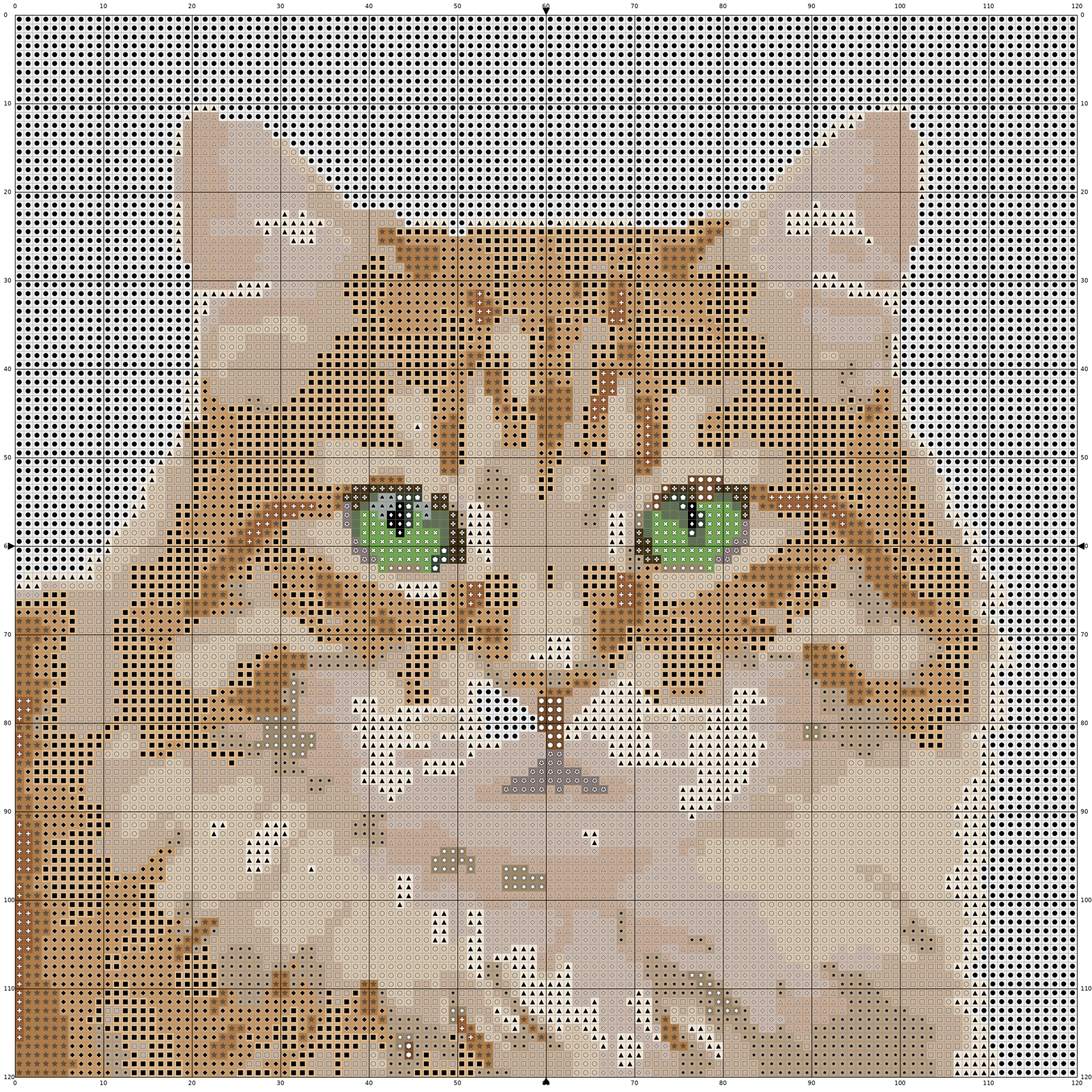

DMC floss list
20 colors · most stitches first
- DMC Blanc White 4,333 st 3 skeins
- DMC 3033 Mocha Brown – Very Light 1,604 st 2 skeins
- DMC 738 Tan – Very Light 1,588 st 2 skeins
- DMC 842 Beige Brown – Very Light 1,481 st 1 skein
- DMC 422 Hazelnut Brown – Light 1,238 st 1 skein
- DMC 453 Shell Gray – Light 1,131 st 1 skein
- DMC 3866 Mocha Brown – Ultra Very Light 790 st 1 skein
- DMC 3864 Mocha Beige – Light 634 st 1 skein
- DMC 3782 Mocha Brown – Light 595 st 1 skein
- DMC 680 Old Gold – Dark 535 st 1 skein
- DMC 868 Hazel Nut Brown 117 st 1 skein
- DMC 989 Forest Green 86 st 1 skein
- DMC 3032 Mocha Brown – Medium 86 st 1 skein
- DMC 451 Shell Gray – Dark 46 st 1 skein
- DMC 3031 Mocha Brown – Very Dark 46 st 1 skein
- DMC 869 Hazelnut Brown – Very Dark 29 st 1 skein
- DMC 3363 Pine Green – Medium 27 st 1 skein
- DMC 890 Pistachio Green - ULT DK 16 st 1 skein
- DMC 310 Black 9 st 1 skein
- DMC 927 Gray Green – Light 9 st 1 skein
FAQ
Questions, answered.
How do I turn a photo into a cross-stitch pattern?
Pick or snap a photo, crop it, choose Quick, Standard or Detailed, and the app returns a chart with DMC codes.
What is “confetti” and does StitchSnap clean it up?
Confetti is isolated single stitches scattered across a chart. StitchSnap absorbs orphan stitches and tiny regions before you see the chart.
Does it use real DMC floss colors?
Yes. Every color maps to a DMC code and name, with stitch and skein counts.
What size will my finished piece be?
The result screen shows the finished size at 14, 16 and 18 count Aida, plus a time estimate. For example, the bundled 60 × 60 sample chart is 4.3" × 4.3" at 14 count.
Can I print the chart?
Yes: a multi-page PDF with the chart pages and a DMC legend. It’s free to preview; unlock the printable PDF in the app.
What photos work best?
A bright photo, one clear subject, plain background. The optional Remove background setting helps on a clean studio backdrop.